You have decided to build a mobile app for your business. Good. Then your development partner or technical consultant asks the question that sounds technical but fundamentally shapes your budget, timeline, and company roadmap: “Should we build it in Flutter, React Native, or native?”
If you do not know what those terms mean, you are not alone. Most business owners, directors, and non-technical founders do not, and they should not have to. But the answer affects how much you pay upfront, how fast you reach the Google Play Store and Apple App Store, how responsive and smooth the app feels in daily usage, how easy it is to maintain, and how difficult it will be to hire developers three years down the line.
This plain-language guide explains the three approaches honestly, compares them side by side across real-world commercial factors, and gives you a structured framework to decide. There is no single universal winner: the right choice depends on your app's core functions, your budget, your target users, and your team's technical assets.
The Short Answer: Quick Decision Cheat Sheet
Choose Flutter If:
You want a single codebase for Android & iOS, a highly polished, branded custom UI that looks pixel-identical on every screen, smooth animations, and your app is primarily composed of screens, interactive forms, catalogs, reports, and dashboards.
Choose React Native If:
You want one shared codebase for Android & iOS, already have web developers skilled in JavaScript or React, want to share logic or business components with a web platform, or prefer UI that adopts standard native platform controls.
Choose Native If:
Your app relies heavily on low-level device sensors, Bluetooth hardware, demanding 3D graphics, Augmented Reality (AR), background audio processing, or you require the utmost raw performance and have the budget to build and maintain two separate apps.
First: What Do These Terms Actually Mean?
1. Native App Development
Native development means building two entirely distinct, separate mobile applications from scratch, using the official programming languages and software development kits (SDKs) created by the platform creators:
- Android: Written in Kotlin (or Java) using Google's Android Studio and Jetpack tools.
- iOS: Written in Swift (or Objective-C) using Apple's Xcode and UIKit/SwiftUI.
Because you are writing in the phone's native tongue, each application has immediate, direct access to every chip, camera sensor, hardware feature, and operating system API. However, you are building, testing, and maintaining two codebases with two separate teams of specialized software engineers.
2. Flutter (by Google)
Flutter is an open-source software toolkit developed by Google. Developers write the application code once in an elegant programming language called Dart, and Flutter compiles it into native machine code for both Android and iOS (as well as web and desktop).
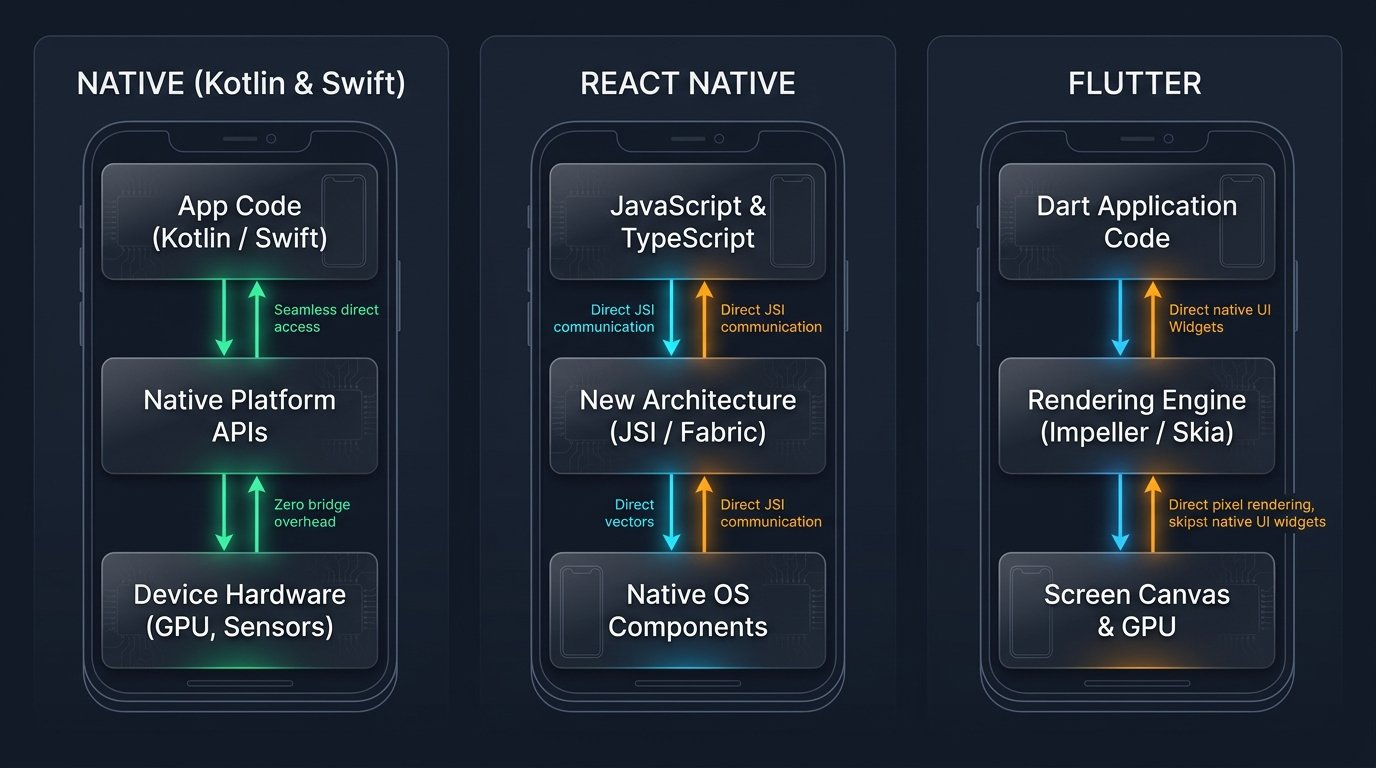
What makes Flutter unique is its internal architecture: instead of translating your buttons and text into the operating system's native UI controls, Flutter ships with its own high-performance rendering engine (Impeller and Skia). Flutter paints every individual button, curve, typography glyph, and animation directly onto the canvas pixels of your phone's screen. As a result, your application looks and functions 100% identically on an entry-level Android handset and a flagship iPhone.
3. React Native (by Meta)
React Native is an open-source mobile framework initially created by Meta (Facebook). Developers write application code once in JavaScript or TypeScript—the same languages used to build interactive websites across the globe.
Unlike Flutter, React Native does not draw pixels from scratch. Instead, it invokes the actual native platform UI components of Android and iOS under the hood. In recent years, React Native underwent a monumental architectural upgrade (the New Architecture with JSI, Fabric, and TurboModules), removing the older asynchronous communication bridge and giving JavaScript direct, lightning-fast memory access to native C++ components.
A Fourth Modern Option: Kotlin Multiplatform (KMP)
Kotlin Multiplatform allows developers to share backend business logic, validation rules, networking pipelines, and database caching between Android and iOS, while still keeping native UI screens (Jetpack Compose on Android and SwiftUI on iOS). It is gaining popularity among teams with existing Kotlin talent. While less common for everyday small-business MVPs, it represents an exciting hybrid option worth noting.
An Easy Analogy: Building a Restaurant Chain in Two Cities
Imagine you want to open a premier restaurant in Mumbai and another in Ahmedabad:
The Native Approach
You hire two separate local architectural firms. Each builds a unique, bespoke restaurant custom-tailored to the exact building permits, local stone, and quirks of each city. Each restaurant is extraordinary, but you paid double for two architecture blueprints, two interior crews, and two long construction timelines.
The Cross-Platform Approach (Flutter / React Native)
You create a master franchise blueprint and proven interior design system. You roll out the exact same polished dining experience in both cities simultaneously. You save significant capital and time, maintain brand consistency, and make minor menu tweaks where local tastes demand it.
For 90% of dining businesses, the master franchise model is far more profitable and faster to scale. For a radically avant-garde architectural experiment, custom native architecture is justified.
Architectural Comparison: How Each Technology Runs
Understanding what happens underneath the glass helps explain why performance differences have practically vanished for commercial apps:
Side-by-Side Comparison: 11 Critical Evaluation Factors
Here is how Native, Flutter, and React Native compare across the eleven factors that matter most to business stakeholders:
| Decision Factor | Native (Kotlin & Swift) | Flutter (Dart) | React Native (JS / TS) |
|---|---|---|---|
| Number of Codebases | Two separate codebases (Android + iOS) | 1 Codebase Unified for both | 1 Codebase Unified for both |
| Programming Language | Kotlin (Android) / Swift (iOS) | Dart (Google's type-safe language) | JavaScript / TypeScript |
| Development Cost | Highest Two distinct builds & teams | Lower ~30%–45% cost savings | Lower ~30%–45% cost savings |
| Time to Launch (MVP) | Longest (parallel or sequential builds) | Fast Rapid prototyping & hot reload | Fast Rapid setup with Expo ecosystem |
| Performance & Smoothness | Peak 120 FPS Direct hardware access | Excellent 60–120 FPS (Impeller engine) | Excellent 60–120 FPS (New Architecture) |
| Look and Feel | 100% platform-native feel | Custom, branded, pixel-identical on all devices | Platform-native feel using OS widgets |
| Custom UI & Complex Animations | High fidelity, but requires double the effort | Industry Best Incredible rendering control | Good, supported by Reanimated & Skia |
| Access to New OS Features | Day 1 Immediate release support | Fast via plugins; custom code if brand-new | Fast via community packages; custom bridge if new |
| Heavy Graphics, AR & 3D | Best Choice Metal, Vulkan, ARKit | Good for standard 2D/3D (Flutter GPU) | Possible, but requires native bridging modules |
| Sharing Code with Web | No direct code sharing | Moderate (Flutter Web for PWAs/dashboards) | High Shared business logic with React web |
| Hiring & Developer Talent | Large talent pool, but requires two specialists | Growing rapidly, highly enthusiastic community | Massive Vast JavaScript developer pool |
| Long-Term Maintenance | Two codebases, libraries, and SDK updates | Single Codebase Lower recurring upkeep | Single Codebase Lower recurring upkeep |
*Note: “Lower cost” and “faster launch” are typical industry benchmarks. The actual project estimate depends on API complexity, design fidelity, and backend architecture.
Performance in 2026: Does Cross-Platform Still Feel Slower?
A few years ago, business leaders had a valid hesitation: early cross-platform applications sometimes stuttered when scrolling large lists or delayed touch responses. In 2026, that performance gap has virtually closed for commercial business apps.
Flutter's Impeller Engine
Google replaced legacy shaders with Impeller, a custom graphics engine precompiling shaders ahead of time. This completely eliminated the “first-run shader compilation jank” that affected early Flutter versions, delivering butter-smooth 60 and 120 FPS animations.
React Native's New Architecture
React Native replaced its old JSON-over-the-bridge serialization pipeline with JSI (JavaScript Interface) and Fabric. JavaScript now directly invokes C++ and native elements with zero serialization overhead, making touches and screen transitions feel instantaneous.
For 95% of business applications—ordering systems, customer accounts, delivery dispatch, quotation tools, textile inventories, learning apps, and booking portals—end users cannot perceive any difference between a well-engineered Flutter/React Native application and a pure native build.
The Golden Rule of Mobile Engineering: A well-architected Flutter or React Native app will outperform a poorly constructed native app every single day of the week. Code cleanliness, lightweight assets, fast API responses, and database indexing matter far more than the framework logo.
Detailed Strengths, Limits & Best Fits
Flutter: The UI Craftsman
By Google • DartCore Strengths:
- One Codebase, Perfect Consistency: What you see on an Android phone is mathematically identical to what appears on an iPad or iPhone.
- Pixel-Perfect Custom UI: Because Flutter controls every pixel on screen, designing custom sliders, charts, complex interactive diagrams, and fluid brand micro-interactions is effortless.
- Exceptional Developer Velocity: State-preserving Hot Reload allows engineers to see code adjustments in sub-seconds without resetting the app state.
- Multi-Platform Expansion: Compile the same codebase to desktop (Windows/macOS) and web dashboards with minimal code alterations.
Known Limits to Consider:
- Smaller Talent Pool: Dart is less ubiquitous than JavaScript, though the community is exceptionally passionate and fast-growing.
- Slightly Larger Initial App Binary: Flutter bundles its rendering engine inside the application, resulting in an initial download size around 15–25 MB compared to a bare-bones 8 MB native app.
- Web SEO Limitations: Flutter for Web compiles via CanvasKit/HTML, making it superb for internal PWAs and portals, but less suitable for public, SEO-heavy content websites.
React Native: The Ecosystem Giant
By Meta • JavaScript / TypeScriptCore Strengths:
- Vast Developer Ecosystem: JavaScript and TypeScript are the most popular languages on Earth. Finding, hiring, and replacing development talent is straightforward.
- Web Code & Logic Sharing: If your company's web portal or backend dashboard is built with React, your engineers can reuse validation schemas, Redux state, and API service classes.
- Authentic Native Feel: By utilizing underlying OS UI widgets, dialog boxes, scroll physics, and keyboard behaviors feel completely native to each respective OS.
- Expo Tooling: The modern Expo ecosystem dramatically speeds up builds, push notification configurations, and over-the-air (OTA) bug fixes.
Known Limits to Consider:
- Third-Party Dependency Maintenance: React Native relies on community npm packages for specialized native modules; package upgrades require experienced architectural governance.
- Complex Native Bridging: Advanced Bluetooth or niche camera features may require custom native Swift or Kotlin code to bridge smoothly.
- Slightly Less Pixel Control: Achieving identical UI across operating systems requires more styling tweaks than Flutter's self-contained canvas.
Native (Swift & Kotlin): The Raw Powerhouse
Apple & Google Official SDKsCore Strengths:
- Uncompromised Performance: Highest possible frame rates, lowest memory footprint, and instantaneous execution.
- Zero-Day OS Feature Access: Access newly announced iOS/Android hardware sensors (Dynamic Island, LiDAR, Apple Neural Engine, Android Health Connect) on day one.
- Deep Hardware Integration: Flawless background syncing, Bluetooth Low Energy (BLE) beacons, GPS geofencing, and USB peripherals.
- No Dependency on Third-Party Framework Upgrades: Direct Apple and Google documentation without reliance on open-source cross-platform maintainers.
Known Limits to Consider:
- Double the Budget: You are funding two distinct engineering efforts, doubling development and QA hours.
- Longer Launch Horizons: Rolling out new feature sets takes longer because logic must be coded and tested twice.
- Feature Drift Risk: Android and iOS versions can easily drift apart in feature parity or timeline without rigorous project management.
Which One for Your Specific Type of App?
To cut through technical jargon, here is our battle-tested technology recommendation across standard commercial use cases:
| Your App Category | Recommended Stack | Why It Is the Best Choice |
|---|---|---|
| B2B / B2C E-Commerce App | Flutter or React Native | Standard product catalogs, carts, payment gateways, and order tracking benefit from a single shared codebase and swift updates. |
| Agent / Field Sales App (Stock, Orders, Challans, Invoicing) |
Flutter | Heavy on custom data tables, barcode scanning, offline caching, and responsive PDF invoice generation across diverse Android devices. |
| ERP / Billing Companion App | Flutter or React Native | Displays live accounting reports, ledger balances, and approval buttons synced with your central ERP server. |
| Service & Appointment Booking | React Native or Flutter | Calendar interfaces, push notifications, and payment gateways operate reliably across both platforms. |
| Delivery & Logistics with Live GPS | Flutter / RN + Native GPS module | Standard UI in cross-platform; background location tracking and driver battery optimization bridged with native services. |
| Fintech & Secure Payments | Flutter / React Native or Native | Security depends on backend cryptography, PCI-DSS compliance, and biometric authentication (FaceID/Fingerprint), which all three support. |
| Social / Video-Streaming App | Native (or High-End React Native) | Heavy real-time video encoding, audio mixing, camera filters, and memory-intensive feeds often favor native Swift/Kotlin. |
| 3D Games, Augmented Reality (AR) | Native (or Unity / Unreal Engine) | Cross-platform UI toolkits are not engineered for 60 FPS 3D rendering or AR mesh processing. |
| Bluetooth, IoT & Factory Hardware | Native (or Cross-Platform + Native Bridge) | Requires low-level Bluetooth Low Energy (BLE) background sockets and hardware handshakes. |
| Startup MVP (Validating an Idea) | Flutter or React Native | Time-to-market and capital efficiency are king. Launching on both stores at ~50% the timeline is decisive. |
| Single-Platform App (Android-Only) | Native Kotlin or Flutter | If 100% of your users use rugged enterprise Android tablets, native Kotlin provides deep OS control without cross-platform overhead. |
Real-World Case Study: Surat Textile Manufacturer App
The Challenge: A prominent Surat textile manufacturing and trading company was struggling with manual paper orders. 45+ field sales agents visiting wholesale markets across Maharashtra and Gujarat were calling the head office to check stock availability and relay orders over WhatsApp, causing frequent shipment errors and delayed dispatches.
The Tech Choice: The client initially requested separate native Android and iOS apps. Tryon Infosoft evaluated their workflow and recommended Flutter paired with a centralized Node.js/PHP API connected to their internal ERP.
The Result: The client launched their enterprise order booking and inventory app in just 9 weeks, saving an estimated ₹3.8 Lakhs compared to dual-native builds. The app provides instant offline catalog browsing, barcode scanning for fabric rolls, WhatsApp PDF order sharing, and live ledger synchronization.
What About Cost, Speed & Hidden Expenses?
Be skeptical of any agency that quotes an app cost without thoroughly analyzing your user journeys, backend architecture, and third-party API dependencies. However, general cost dynamics follow predictable patterns:
- Native Builds Cost More: You are paying two specialized senior developers (one iOS, one Android) alongside two separate testing cycles.
- Cross-Platform Saves 30%–45%: While the frontend mobile codebase is unified, you still build one shared backend API, design UI mockups, conduct device testing, and deploy store listings.
- The Backend is Often 50% of the Work: User databases, secure authentication, admin management portals, automated PDF invoice generation, and ERP connectors take equal effort regardless of your mobile frontend.
6 Hidden Costs Every App Owner Must Plan For:
- Backend & Admin Panel: The mobile app is only the tip of the iceberg; the server backend, cloud database, and web admin portal represent substantial engineering.
- Third-Party APIs: Recurring monthly expenses for WhatsApp Business Cloud API, SMS OTP gateways (MSG91/Twilio), Payment Gateways (Razorpay/Stripe), and Google Maps API calls.
- App Store Developer Accounts: Apple charges $99 (~₹8,300) annually; Google Play requires a one-time $25 (~₹2,100) registration fee.
- Real Device Testing: Testing across diverse screen aspect ratios, Android OS skins (Samsung OneUI, Xiaomi MIUI, OnePlus OxygenOS), and iOS versions.
- Annual OS Updates: When Apple releases iOS 19/20 or Google releases Android 16/17, permissions, privacy policies, and push notification protocols change, requiring maintenance patches.
- Cloud Hosting & Server Monitoring: Monthly cloud infrastructure (AWS, DigitalOcean, or Hostinger VPS) to maintain 99.9% API uptime.
Is There an Alternative to Building an App at All?
As an ethical software development company, our first responsibility is helping you avoid building software you do not actually need. Before commissioning a mobile app, evaluate whether a lighter digital alternative solves your problem faster and cheaper:
Mobile-Responsive Web
If users only check information once or twice a month, a lightning-fast responsive website is 100x easier to find via Google Search without demanding phone storage.
Progressive Web App (PWA)
PWAs run in web browsers, can be installed directly onto smartphone home screens, work offline, and bypass app store review approval delays entirely.
WhatsApp Automation
For sending invoice PDFs, order tracking, payment reminders, and customer support, automated WhatsApp bots often achieve 10x higher open rates than native apps.
When does a native or cross-platform mobile app become essential? When you require instant push notifications, persistent offline data storage, biometric security, camera/barcode scanning at high velocity, background location tracking, or daily habit-forming customer engagement.
A Simple 7-Question Decision Framework
Answer these seven questions honestly to arrive at your optimal technical architecture:
-
Q1
Do I need my application to run on both Android and iOS?
If yes, cross-platform (Flutter or React Native) will save you substantial capital, time, and coordination headaches.
-
Q2
Is my project budget constrained, or do I need to launch an MVP quickly?
If yes, lean toward cross-platform. Building one app instead of two ensures faster market testing and lower initial risk.
-
Q3
Does my app depend on heavy 3D graphics, Augmented Reality (AR), or continuous low-level Bluetooth hardware?
If yes, choose pure Native (Kotlin & Swift) or a dedicated game engine like Unity.
-
Q4
Is a bespoke, highly branded custom design with fluid animations a core competitive differentiator?
If yes, Flutter is an exceptionally strong candidate due to its custom pixel-rendering Impeller engine.
-
Q5
Do I already have an in-house React web team or a web app built on React?
If yes, React Native allows your developers to reuse business logic, component paradigms, and skills seamlessly.
-
Q6
How large will this application become over the next 5 to 10 years?
A massive, mission-critical product with hundreds of specialized engineers may justify separate native engineering branches.
-
Q7
Who will maintain, debug, and upgrade the application in three years?
Choose an established technology stack that your technical partner and the broader developer hiring market can reliably support.
The Rule of Thumb: If you answered “YES” to Questions 1 & 2, and “NO” to Question 3, you are overwhelmingly a prime candidate for a cross-platform solution (Flutter or React Native).
8 Common Mistakes Business Owners Must Avoid
- Choosing a framework simply because it is trending: Choose the stack that fits your specific application workflow, user base, and maintenance capabilities.
- Assuming cross-platform equals exactly 50% cost savings: You save significantly on frontend code, but server backend, UX research, real device QA, and API integrations cost the same.
- Selecting native development for a simple data app: Paying for two distinct codebases just to display product catalogs, forms, and order receipts is a wasteful allocation of capital.
- Committing to cross-platform for complex hardware/sensor tools without a feasibility proof-of-concept: Always validate specialized Bluetooth or camera libraries first.
- Failing to confirm source code ownership: Always ensure your legal contract states that you own 100% of the repository, credentials, and documentation upon project handover.
- Skipping a clickable prototype or MVP: Never invest in building a 12-month monolith before testing a lightweight 6-week MVP with real customers.
- Ignoring post-launch maintenance budgets: Budget 15%–20% of initial build costs annually for OS updates, security patches, and library refreshes.
- Judging developers solely by polished Figma demos: Anyone can present mockups. Insist on testing live, published mobile apps they have deployed in the Google Play Store and Apple App Store.
6 Crucial Questions to Ask Your Mobile App Development Partner:
- “Why do you recommend this specific framework for my project, rather than just because it's your agency's favorite tool?”
- “What parts of my app might require native custom code, and how will your team bridge them?”
- “How will the application perform on budget Android smartphones, which represent the majority of devices in India?”
- “What is your process for handling annual major iOS and Android OS updates?”
- “Do I receive full ownership of the Git repository, API keys, and deployment credentials upon milestone completions?”
- “Can you show me live, active mobile applications built with this stack currently functioning on user devices?”
How Tryon InfoSoft Can Help Your Business
Since 2016, Tryon InfoSoft has engineered mission-critical mobile applications, web portals, and custom software systems for commercial enterprises across India, Canada, and Germany. We are not married to any single dogma or tool: we evaluate your business goals, target user personas, budget, and growth roadmap, and then recommend the exact technology stack that delivers the highest return on investment.
Our comprehensive mobile engineering services include:
- Technology Advisory & Architecture Planning: Impartial consultation so you choose between Flutter, React Native, Native, or PWA with complete confidence.
- Rapid Prototyping & MVP Development: Designing clickable Figma prototypes and functional 6-to-8 week MVPs to test market demand with minimal risk.
- Cross-Platform & Native Mobile Development: End-to-end development in Flutter, React Native, Android Kotlin, and iOS Swift following clean architecture standards.
- Enterprise Backend & ERP Integration: Building secure RESTful APIs connecting your mobile app directly to your internal ERP, billing software, warehouse stock, and WhatsApp notification channels.
- Rigorous QA, App Store Deployment & Ongoing SLA: Managing end-to-end Google Play and Apple App Store review approvals, ongoing OS patch updates, and database monitoring.
Recommended Next Reads & Services:
- Explore our dedicated Mobile App Development Services for Android and iOS.
- Read: Custom Software vs Ready-Made Software: Which Is Right for Your Business?
- Read: How AI Features Make Business Apps Smarter in 2026
- Read: Why Textile Businesses in Surat Need Custom ERP Software
Frequently Asked Questions (FAQ)
Native apps are built separately for Android (using Kotlin) and iOS (using Swift). Flutter and React Native enable developers to write code once that compiles for both operating systems. The key difference between the two is that Flutter uses its own graphics rendering engine (Impeller/Skia) to paint every pixel from scratch, while React Native invokes the operating system's native UI elements via modern JavaScript interfaces.
Neither framework is universally “better”; they serve different project priorities. Flutter excels at custom, brand-driven designs, pixel-identical visual consistency across platforms, and fluid micro-animations. React Native shines when your organization already has React/JavaScript engineers, wants to reuse code with web applications, or prefers interface components that feel deeply native to each platform.
Both frameworks deliver outstanding, butter-smooth 60 to 120 FPS performance for typical business apps. Flutter introduced the Impeller engine to eliminate shader compilation stutter, while React Native deployed its New Architecture (JSI and Fabric) to remove serialization bottlenecks. The difference in real-world business apps is negligible; clean architecture, lightweight database queries, and optimized image assets have a vastly larger impact on perceived speed.
No. While pure native development offers the highest potential performance and immediate Day-1 access to newly released hardware features, it requires funding and coordinating two separate codebases. For 85%+ of commercial mobile applications (catalogues, ordering systems, portals, booking tools), modern cross-platform quality is virtually indistinguishable from native at a fraction of the budget.
Cross-platform options (Flutter and React Native) are typically 30% to 45% cheaper to build and maintain than developing two separate native applications. However, the exact total budget is influenced primarily by backend API complexity, third-party integration licenses, security requirements, and custom design depth.
Yes, absolutely. All core smartphone hardware capabilities—including high-resolution cameras, GPS geofencing, Bluetooth, biometrics (FaceID and fingerprint), push notifications (FCM/APNs), and payment gateways (Razorpay, Stripe, UPI)—are fully supported via robust, production-proven plugins and official libraries.
Switching frameworks later usually requires rewriting the entire frontend presentation layer, although your backend APIs, cloud databases, and business business rules remain intact. This is why investing in an upfront technical consultation before writing code is so critical.
Yes. Apple and Google maintain distinct app stores with separate developer guidelines, review processes, and bundle formats (.apk/.aab for Android and .ipa for iOS). With Flutter or React Native, you build both store-ready packages from a single unified codebase.
It depends entirely on user behavior. If your users only visit occasionally or need to discover you via Google search, a fast responsive website is best. If your business requires offline data storage, real-time push notifications, field staff tools, frequent re-engagement, or hardware scanning, a dedicated mobile application delivers a vastly superior experience.
A focused Minimum Viable Product (MVP) built on Flutter or React Native typically takes between 6 to 10 weeks from initial design to app store submission. Highly complex enterprise systems featuring custom ERP connectors, complex payment flows, multi-role permissions, and custom offline sync engines can take 3 to 6 months.